Building an AI platform is one problem. Getting existing, working AI systems onto it is another, and in my experience it’s the harder one. The models already serve real users, the team that owns them keeps shipping changes, and nobody wants to hear that the migration will freeze their roadmap for a quarter.
This post is about one of those migrations. A large enterprise client had set up a central AI platform on Azure for all of its AI and ML work. One of its most AI-heavy systems, the platform its researchers use to track regulatory changes, still ran its AI workloads on AWS. Our job was to move those workloads onto the central Azure platform without disrupting day-to-day operations or the team’s development plans.
The setting: AI inside a regulatory research pipeline
Researchers have to keep up with a constant flow of regulatory change across many regions. The research platform helps them do that. Content arrives through two data pipelines: a primary pipeline that processes web sources and a secondary pipeline that processes email sources. Both feed a content database that researchers and downstream services work from.
AI does a lot of the heavy lifting inside those pipelines: classifying whether content is relevant at all, segmenting documents, reducing noise, extracting rules, analysing what changed, linking content to the right regions and categories, and grouping similar items. Every AI output is still reviewed by a researcher. The models speed up the work; they don’t replace the judgement.
At a high level, both pipelines follow the same three-step shape:
- Pre-processing: transform incoming content into a common format. No AI.
- AI inference: call model endpoints to extract insights.
- Publishing: submit the results to other services for storage and use. No AI.
That shape turned out to matter a great deal for the migration, as you’ll see.
What we found
The first phase of the project was discovery and, in places, reverse engineering. We wanted a complete picture of the AI estate before deciding how to move it.
The models. There were 24 AI models across development and production: traditional ML classifiers, an embedding model, LLM-based extraction steps and one ensemble that combined traditional ML with an LLM. Several of the older ML models were about to be replaced by newer LLM-based versions, and some weren’t in use at all. Migrating those would have been wasted effort, so we cut the scope to 10 models.
The clouds. The platform ran almost entirely on AWS: backend services, user-facing apps, data pipelines, model training, inference and storage. The one exception was LLM inference, which already used Azure OpenAI, but through a single endpoint shared by every AWS account and environment. That needed to become a proper multi-environment setup anyway.
The environments. Four AWS accounts (production, stage, development and DevOps) hosted six permanent environments, plus short-lived exploratory and developer-specific ones:
| Environment | Purpose |
|---|---|
| Production | Inference for live applications |
| Staging | Mirrors production for testing |
| Stable | Manual acceptance testing by researchers before new features ship |
| Sandbox | Development and exploratory work |
| ML | Model training and feature storage |
| DevOps | Central store for models, containers and other AI artefacts |
The MLOps maturity. The ML lifecycle was built around SageMaker. Data scientists prototyped in notebooks, then moved mature code into Python modules. Training ran as manually triggered SageMaker Pipelines, models went into the SageMaker Model Registry, and a custom Python module, driven by YAML configuration and called from CI/CD, deployed them as real-time endpoints. Terraform provisioned the infrastructure.
Against the AWS MLOps maturity model, this sat between “initial” and “repeatable”, leaning towards repeatable. The biggest gaps were manual steps: copying production data into the sandbox for training, triggering training, and gating promotions between environments.
The central platform. The Azure AI platform was in good shape for LLM workloads, with solid networking, environment isolation and LLM serving. It had been built mostly for generative AI, though, so traditional ML training and artefact storage needed work before they could take these models.
Three decisions that shaped the migration
1. Move the inference, not the pipelines
The obvious move would have been to lift the whole pipelines across. We recommended against it.
Only the inference step in the middle of each pipeline actually used AI. Moving the pre-processing and publishing logic would have brought the code closer to the models, but the efficiency gain was small, and it would have created a lot of friction for the research platform team, who owned and kept changing those pipelines. So the pipelines stayed on AWS, and only the model endpoints moved. The pipelines simply started calling Azure instead of SageMaker.
That boundary held to the end. Azure didn’t replace AWS for this product. The AI, ML and LLM workloads moved; the main data pipelines, the data engineering around them and their Airflow orchestration stayed where they were.
Two other details made this cleaner than it might have been. Nothing else in the application called the models directly: every other service read AI results from the content database. And the SageMaker feature store was only used for training, never at inference time, so inference and training could be migrated independently and in parallel.
2. Go native, not cross-platform
We considered replacing SageMaker with cloud-neutral tooling, either as a stepping stone or as the end state. We decided against that too. The point of the exercise was to consolidate on one platform, and a cross-platform layer would have kept much of the overhead while giving up most of the benefit of centralisation. Every AWS service got a native Azure equivalent:
| AWS | Azure |
|---|---|
| SageMaker | Azure Machine Learning |
| SageMaker Model Registry | Azure ML model registry |
| SageMaker inference endpoints | Azure ML managed online endpoints |
| SageMaker Feature Store | Azure ML feature store |
| SageMaker Experiments | Azure ML experiments |
| SageMaker hyperparameter tuning | Azure ML HyperDrive |
| SSM Parameter Store | Azure Key Vault or App Configuration |
| S3 | Azure Blob Storage |
| CodeArtifact | Azure Artifacts |
| CloudWatch | Azure Monitor |
| Secrets Manager | Azure Key Vault |
The aim of the first stage was re-platforming: the models and pipeline logic stay the same, and only their runtime changes. That still meant real work. Everything that used the AWS SDK or CLI had to be rewritten for Azure, and the AWS-provided Docker images used for inference and training had to be rebuilt for Azure’s container registry. Raising MLOps maturity further was deliberately left for a second stage, once the migrated workloads were stable.
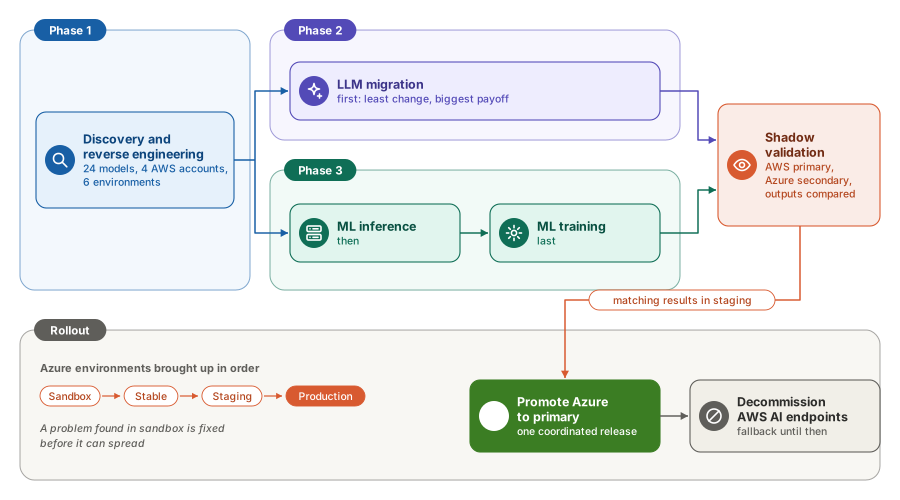
3. Shadow deployment, not a big-bang cut-over
We set up an identical set of environments in Azure (sandbox, stable, staging and production) and ran AWS and Azure side by side. AWS stayed the primary cloud, serving real traffic. Azure was the secondary cloud, receiving the same work for testing and comparison. Outputs from both were collected and compared, and data and artefacts were kept in sync so that differences reflected the platform, not the inputs.
Environments came up in order: sandbox, then stable, then staging, then production. A problem found in sandbox got fixed before it could spread. Once Azure produced matching results in staging over a validation period, it would be promoted to primary for the AI workloads in one coordinated release, with the AWS endpoints kept as the fallback until they were decommissioned.
Migrating the LLM workloads
LLM workloads went first. They needed the least change and had the biggest payoff, and moving them early let us shake out the new infrastructure on something relatively simple.
The key piece was an LLM gateway built on Azure API Management (APIM) in front of Azure OpenAI, provisioned per environment on the central platform. Instead of every environment calling one shared OpenAI endpoint, each pipeline called the gateway, which routed requests to the right model deployment. The gateway exposed three kinds of endpoint: chat, embeddings and evaluation.
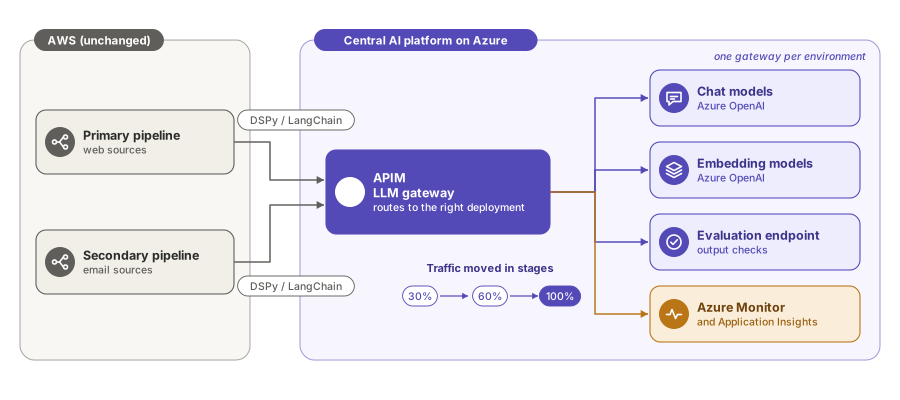
The work involved reshaping request payloads to match what APIM expected, switching the pipelines’ calls over to the gateway, and checking that outputs matched what the old setup produced. Traffic then moved over in stages: 30%, then 60%, then 100%, with Azure Monitor and Application Insights watching each step.
Migrating ML inference
For the traditional ML models, inference came before training. It needed more validation effort, but it depended on fewer AWS-native services, so overall it was the less complex half.
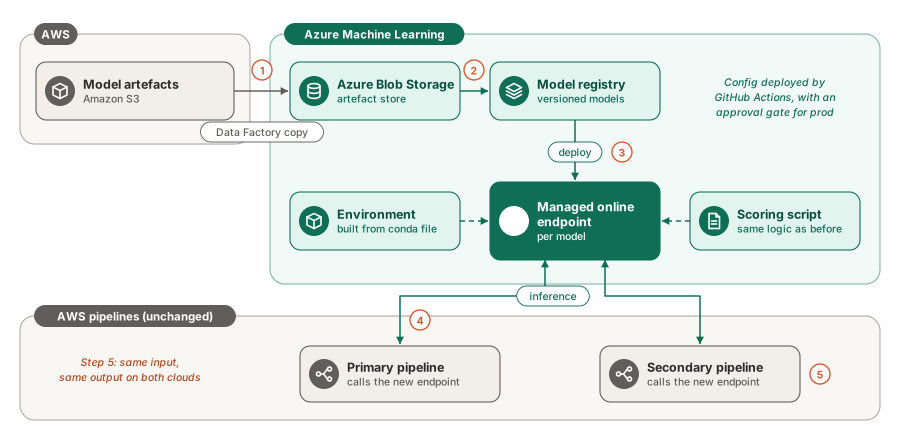
The flow was:
- Copy model artefacts from S3 into Azure Blob Storage, using an Azure Data Factory pipeline.
- Register them in the Azure ML model registry.
- Deploy each model to an Azure ML managed online endpoint, with a scoring script and an Azure ML environment built from a conda file, either curated or custom.
- Point the pipelines on AWS at the new endpoints.
- Validate output parity: the same input should produce the same result on AWS and Azure.
Endpoint configuration (compute size, autoscaling and retry policies) was defined once and deployed through GitHub Actions, with an approval step for promoting artefacts from non-production to production.
Migrating ML training
Training came last. It was the part that most needed capabilities the central platform didn’t have yet.
Data preparation came first. Training data still originates in the production content database on AWS. It’s extracted to Blob Storage instead of S3, copied into the AI platform’s own storage by a Data Factory pipeline, and then processed by feature pipelines into the Azure ML feature store. We compared the new feature store against the SageMaker one to confirm the features matched.
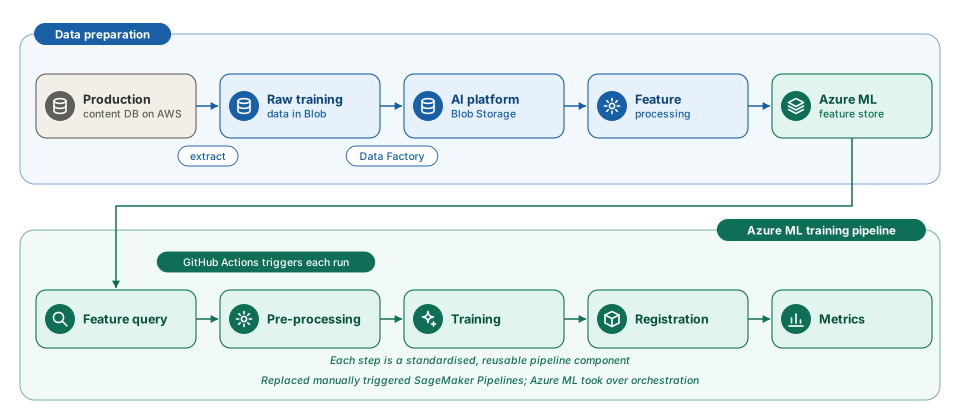
The training pipelines were rebuilt on Azure ML as a standard sequence of steps: feature query, pre-processing, training, registration and metrics. Each step became a standardised, reusable pipeline component, and Azure ML took over orchestration. GitHub Actions triggered training runs, replacing the manually triggered SageMaker Pipelines. Moving to standard components also simplified dependency management, which had been one of the main sources of pain.
What made it hard
Internal library dependencies. The models depended on several shared internal Python packages, built through CI/CD and published to CodeArtifact. Each one had to be refactored where it touched AWS, rebuilt and republished to Azure Artifacts, and validated in the Azure ML environment before the models that used it could move.
Hitting a moving target. The research platform team didn’t stop work while we migrated. They kept improving the AWS pipelines, and new models and requirements arrived mid-project. We handled this with a dedicated branch: the research platform team kept working on main, the migration team worked on uap-main, and we merged at key milestones. We also asked for a second stable environment on AWS, so our migration testing couldn’t collide with their acceptance testing. Both kept conflicts manageable without slowing either team down.
APIM routing with DSPy and LangChain. The LLM steps were built with DSPy and LangChain, and both expect to talk to a model endpoint directly. With APIM in between, calls failed until each framework sent exactly what the gateway expected. The fix wasn’t clever: redirect the Azure OpenAI calls through APIM with the right URL, request headers and body. Getting those three right for each framework was most of the work.
Training migration. Training needed the most new capability on the platform side, and the most adaptation of AWS-specific code and container images.
Release windows. Production releases happened in a reserved weekend window, which business needs could push back. We planned for up to four weeks of waiting for a window when promoting Azure to primary, plus a validation period in staging beforehand.
Lessons learned
- Unify configuration early. With four environments on each cloud, every endpoint, setting and secret has to be set up many times over. Agreeing on one configuration approach at the start saves rework in every environment that comes after.
- Separate the ML and LLM migrations. They have different dependencies, different risks and different effort profiles. Running them as independent tracks let LLM workloads move early while the harder ML work continued in parallel.
- Migrate the AI, not the plumbing around it. Moving only the inference step kept the blast radius small and the owning team productive.
- Cut scope before you migrate. Dropping models that were about to be retired, or were already unused, took more than half the inventory out of scope.
- Shadow before you switch. Running both clouds side by side and comparing outputs turned a risky cut-over into a measured decision.
- Re-platform first, improve second. Changing the runtime and the MLOps practices at the same time multiplies risk. Get stable on the new platform first, then raise the maturity bar.
- Consolidation is the point. The value isn’t the move to Azure as such. It’s having ML, LLMs and MLOps on one governed platform, so the next model is easier to build, deploy and run than the last.
What’s next
With the workloads running on the central platform, the focus shifts to the second stage: raising MLOps maturity from roughly level 2–3 towards level 4 on the Azure MLOps maturity model. That means automating the remaining manual steps (moving training data, gating promotions), monitoring inference quality more fully, and making better use of researcher feedback to improve the models.
The takeaway
This migration wasn’t just a platform shift. It changed how AI is delivered for this product. Moving the inference rather than the pipelines, choosing native services, keeping separate tracks for ML and LLM workloads, and validating everything in a shadow environment before switching let us move the AI of a production system to a new cloud while the rest of it, and the team that owned it, carried on as before.
If you’re planning a large AI migration of your own, I’d love to compare notes. Find me on LinkedIn.